The Best TrendSpider Alternatives in 2026: 6 Tools by Job

Named to the Inc. 5000 list of America’s fastest-growing private companies six years in a row (2017–2022).
Investopedia: Best Short Term Stock Screener, 2024
The short answer: TrendSpider is for building your own chart system, so an alternative should fill the gap you feel. For a live scanner across the market, with OddsMaker and Holly AI Signals, Trade Ideas. For charts and Pine Script, TradingView. For charting on a budget, TC2000. Already at Schwab? thinkorswim scans for free. Trade Ideas makes one of the tools on this page.
This page is on Trade Ideas' own website. See our Trade Ideas vs TrendSpider page for a head-to-head view.
TrendSpider alternatives, by what you need
- Live scanner plus Holly and OddsMaker: Trade Ideas.
- Charts and Pine Script: TradingView.
- Charting on a budget: TC2000.
- A simple screen after the close: Finviz Elite.
- A real-time scanner you build: Scanz.
- Schwab clients: thinkorswim.
- Stay with TrendSpider if you want to build and automate chart rules end to end on TrendSpider.
What TrendSpider does well
TrendSpider takes the manual work out of technical analysis. Trendline drawing, multi-timeframe scans, backtests and order automation are all built in.
Every plan includes 25 messages a month with Sidekick, its research assistant. More messages and more AI models need a separate Sidekick plan, listed on its pricing page at $49, $129 or $349 a month for up to 100, 300 or 1,000 messages. The Holly AI Assistant comes with every TI Pro plan, with no add-on to buy. Its AI Strategy Lab is where you train models of your own.
If you want to build chart rules and automate them, it covers the whole job.
The full feature list is in Trade Ideas vs TrendSpider.
Why system builders try Trade Ideas as a TrendSpider alternative
- Events as they happen. TrendSpider scans on a schedule that depends on the plan. Streaming Alerts report each event across US stocks the moment it occurs.
- Lists that stay current on their own. TrendSpider's Scanner FAQ answers “Can the scan auto-refresh?” with “At this time, the scanner does not auto-refresh,” and points to a circular “Refresh Scan Results” button. In Trade Ideas, Top Lists re-rank every 15 seconds and Streaming Alerts can fire on every trade. TrendSpider's U.S. stock data comes from Nasdaq Basic, according to its status notice.
- Signals, not just research. Sidekick helps you research and build. It is not presented as live trade signals with an entry, a stop and a target.
- A free room. TrendSpider's pricing page does not list a free live trading room.
- Ready-made channels. TrendSpider focuses on building your own system. Some beginners want ready-made channels first.
For system builders, the draw is what happens after the data arrives. Build a derived measurement in the Formula Editor from Trade Ideas variables using math, Boolean logic and if-statements, use it in a strategy, and test it in OddsMaker, whose Optimization tab breaks results down by time of day, price, symbol and filter value. Holly runs the same cycle on her own strategy library every night and picks the ones that trade in the next session. OddsMaker and Holly AI Signals are TI Premium features.
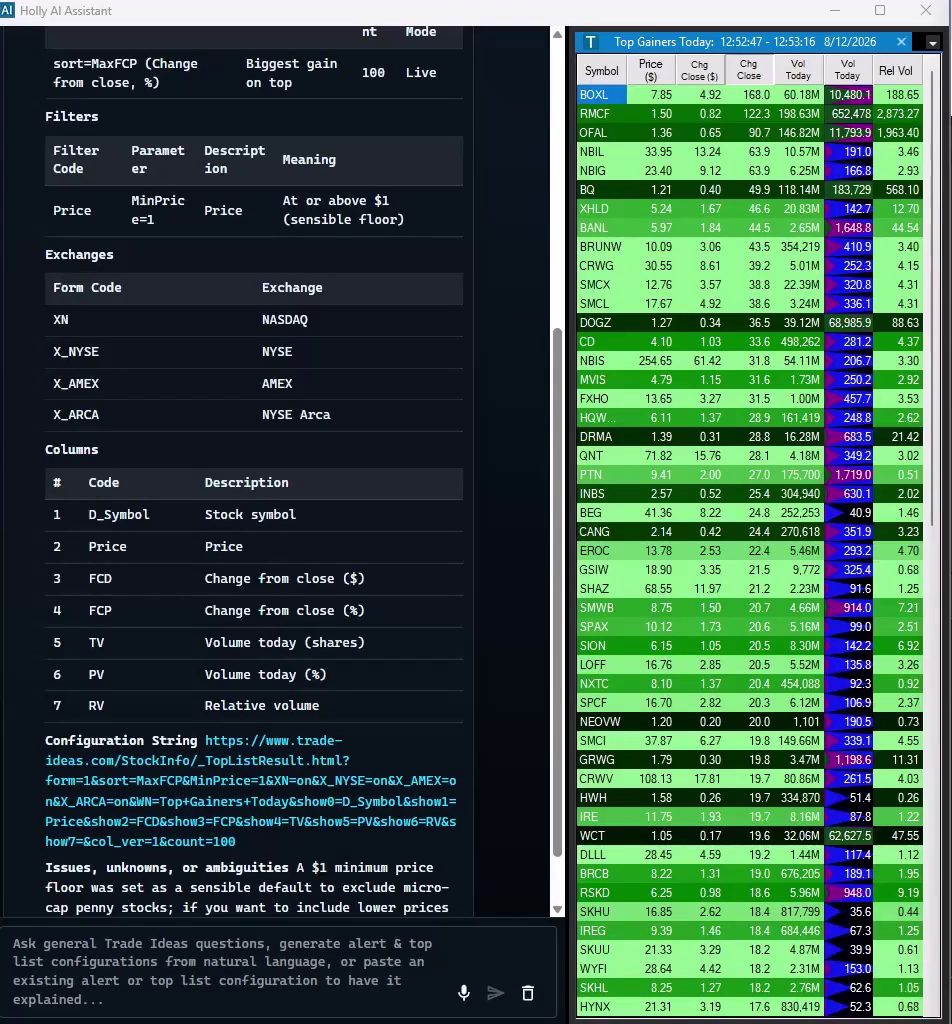
One question, side by side. On August 12, 2026, we recorded the Trade Ideas AI Assistant and Sidekick answering the same top-gainers request, in one take during market hours. Trade Ideas had a live Top List of stocks at $1 or more on NASDAQ, NYSE, AMEX and NYSE Arca up in under 6 seconds, led by BOXL at +168.0%. Sidekick asked which universe we meant, then ranked 21 S&P 500 symbols with Akamai first at +5.25%, saying it "can't honestly claim the exact top 10" for the whole index. Watch the full test →
How we compared TrendSpider alternatives
All TrendSpider alternatives were measured on the same six points. Sources are under How we checked.
- Replaces: the piece of the TrendSpider workflow each tool covers.
- Real-time data: live data and scan frequency, by plan.
- Backtesting: whether testing is built in and whether it needs code.
- AI: assistants and signals the vendor names.
- List price: posted prices, including billing-term ranges.
- Best for: the trading style each tool matches.
TrendSpider alternatives, side by side
| Tool | Replaces which part of TrendSpider | Real-time data | Backtesting | AI | List price | Best for |
|---|---|---|---|---|---|---|
| Trade Ideas | Market-wide discovery and AI signals | Yes, live market data with no scan schedule | OddsMaker, no code (TI Premium / Apex) | Holly AI Signals on TI Premium; Holly AI Assistant in TI Pro on any plan | TI Standard (Core) $127 monthly or $1,068 yearly; TI Premium $254 monthly or $2,136 yearly | Live scanning with Holly and OddsMaker |
| TradingView | Charts and Pine Script | Screener auto-refresh on paid plans | Strategy backtesting; Bar Replay | AI screener requests (paid plans) | Basic $0; Essential $12.95 to Ultimate $199.95/mo billed annually | Chart-first traders |
| TC2000 | Charts and technical scans | Real-time scanning on Premium | Not listed | Not listed | Basic $24.99, Premium $49.99, Premium+ $99.99/mo | Budget charting |
| Finviz Elite | Web screens | Elite: real-time quotes | Not listed | Not listed | Free; Elite $39.50/mo or $299.50/yr | After-hours screens |
| Scanz | Real-time scanner you build | Yes, all plans | Not listed | Not listed | Starter $89, Pro $199, Ultra $999 a month | Traders with a fixed playbook |
| thinkorswim | Broker charts and Stock Hacker | Refresh rate not listed by Schwab | thinkScript strategy testing | Not listed | No charge for Schwab clients | Schwab clients |
Swipe across the table to see each column.
When we say "Not listed," the vendor's own pages didn't show it.
The 6 best TrendSpider alternatives
-
1. Trade Ideas
Best for live scanning with Holly AI Signals and OddsMaker
TrendSpider scans on a schedule set by your plan. Trade Ideas watches US-listed stocks continuously. Streaming Alerts, the scanner, can fire on every trade, and Top Lists, the screener, update every 15 seconds. Upgrade to TI Premium and you get Holly AI Signals, each with an entry, a stop and a target, plus OddsMaker for no-code backtests.
Replaces: Market-wide discovery, AI trade signals and no-code backtesting.
- Real-time data
- Live market data on both plans. There is no scan schedule to wait for.
- Scans and alerts
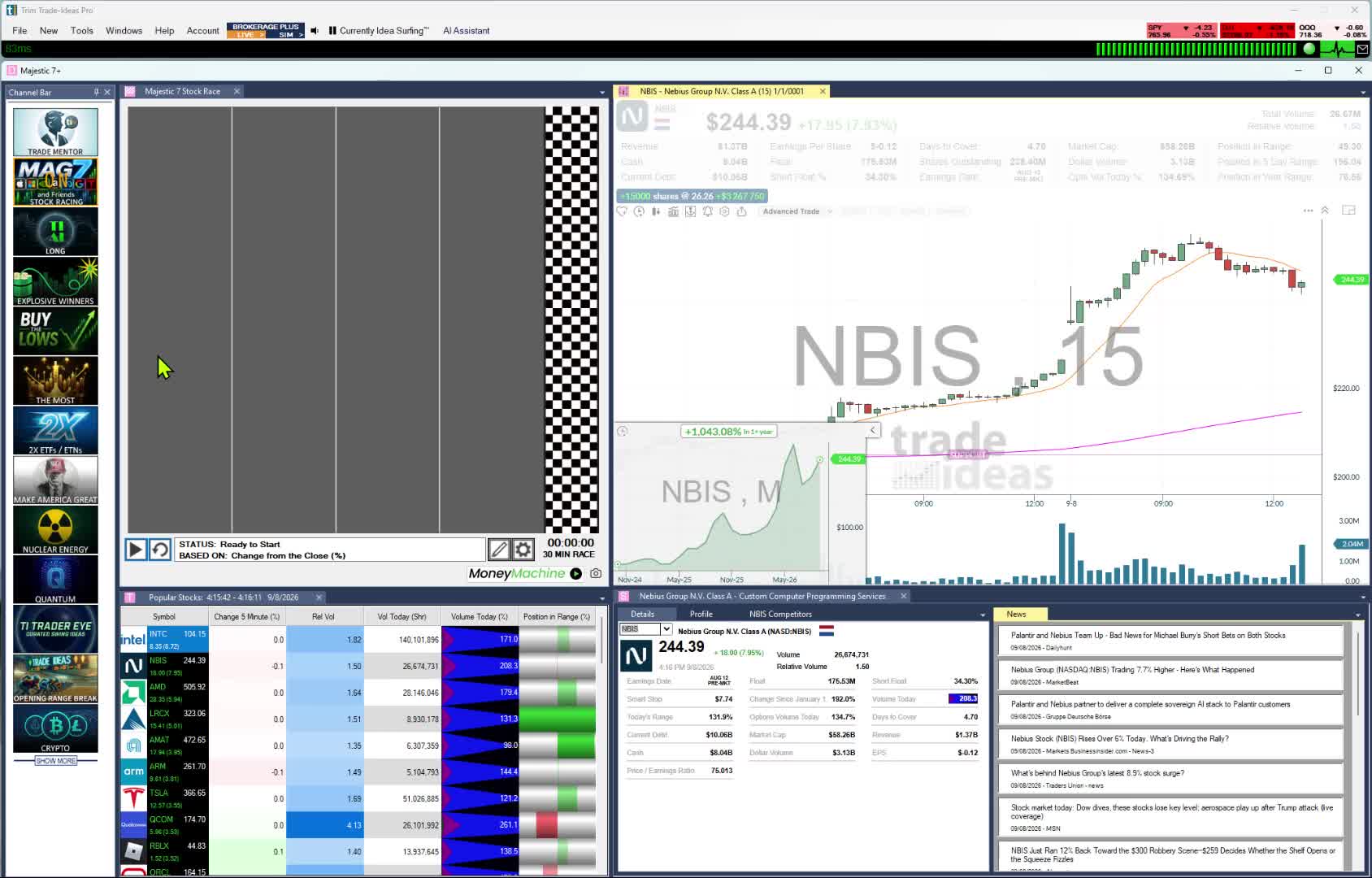
- Chart pattern alerts are among the 310 alerts and 249 filters. No-build Channel Bar presets in TI Pro, on both plans. Type a rule in plain English and the Holly AI Assistant, in every TI Pro plan, builds the Alert window or Top List.
- Backtesting
- OddsMaker runs a scan back through Trade Ideas history, and no script is needed. TI Premium includes it.
- AI
- Holly AI Signals are trade ideas, not research chat. Every signal lists an entry, a stop and a target. TI Premium.
- Beginner-friendly
- Yes. Start from a preset instead of building a system. For guidance, join Barrie Einarson in the free Trading Room.
- Price
- TI Standard: $127/month or $1,068/year. TI Premium: $254/month or $2,136/year. Trading Room: no charge.
Pre-built events, open to tuning. Our help lists 310 alerts and 249 filters, one page each, and any alert can be joined with any set of filters with a minimum and maximum on each. Examples: a 15-minute linear regression up trend, where you can ask for a minimum forecast move in dollars per share; a Fibonacci 50% sell signal; a 5-minute wide range bar. That kind of alert-specific setting exists on 191 of the 310 alerts. Opening range breakouts and breakdowns run at 1, 2, 5, 10, 15, 30 and 60 minutes, for example the 60-minute breakout. The result is an effectively unlimited range of scans without writing code.
Worth knowing: Only US-listed stocks are covered. Want trade plans or automation? Those tools, Holly AI Signals, OddsMaker and Money Machine, come only with TI Premium. TI Pro, with Streaming Alerts, Holly and the AI Assistant, is Windows only. Mac users run the browser-based web Dashboard, which needs no download and has Top Lists, Races, TreeMaps, Market Pulse, Picture in Picture charting, stock details and news, and the Unusual Options Activity channel.
Point, click, or ask. A no-code menu holds 310 alerts and 249 filters, and the AI Assistant, included in every TI Pro plan, builds a scan from plain English. Write a custom filter in the Formula Editor when you need one; TI Premium subscribers can backtest it in OddsMaker and receive Holly AI Signals, entry, stop and target attached, through the trading day.
Best fit: TrendSpider users who want the market scanned for them in real time, and new traders who want the premium experience with no build time.
-
2. TradingView
Best for manual charting and world markets
TrendSpider automates chart work. TradingView leaves more of it to you. It is known mainly for its charts, and its screeners cover stocks, ETFs and crypto on 150+ exchanges in 50+ countries. Custom studies use Pine Script.
Replaces: TrendSpider charting, with screens that include markets outside the US.
- Real-time data
- Its screener can refresh every 10 seconds, or every minute, once you pay. Real-time data on some exchanges is an extra cost.
- Scans and alerts
- You can filter on 500+ technical and fundamental fields. Pine Screener and alerts are also listed.
- Backtesting
- Bar Replay is listed, and so is strategy backtesting.
- AI
- AI screener requests: 100 to 500, depending on the paid plan.
- Beginner-friendly
- Yes. There is a free plan called Basic.
- Price
- Basic $0; Essential $12.95, Plus $29.95 and Premium $59.95 a month, paid yearly (special price on Oct 5, 2026).
Worth knowing: Screener auto-refresh is tied to paid plans. TrendSpider users switching scripts will work in Pine Script, not Python.
Best fit: Chart traders who prefer drawing their own lines, and anyone trading non-US markets.
-
3. TC2000
Best for hands-on charts and scans at a lower price
At its core TC2000 is charts, with scanning added on top. You draw and scan yourself instead of relying on automation.
Replaces: Charts and technical scans, done by hand.
- Real-time data
- Basic includes Nasdaq Basic real-time data for US stocks. Real-time scanning and sorting are listed on Premium.
- Scans and alerts
- Write scans with indicators, formulas and chart data. Up to five can stream at a time.
- Backtesting
- Not listed.
- AI
- Not listed.
- Beginner-friendly
- Fair. There is paper trading, and the chart is the main screen.
- Price
- Basic $24.99, Premium $49.99, Premium+ $99.99 a month. Annual billing makes two months free.
Worth knowing: Scans only update in real time on Premium and above.
Best fit: Technical traders who are happy to draw their own trendlines to save money.
-
4. Finviz Elite
Best for simple screens with no setup
Finviz is a web screener with heat maps of the market. There is nothing to automate. You set filters and read the list. It comes free or as Elite.
Replaces: Scheduled scans you only check once a day.
- Real-time data
- Delayed quotes on the free version. Real-time quotes on Elite, 4:00 a.m. to 8:00 p.m. ET.
- Scans and alerts
- Advanced filters, saved presets and alerts come with Elite. Elite screens refresh every 10 seconds.
- Backtesting
- Not on Finviz's Elite page.
- AI
- Not listed.
- Beginner-friendly
- Yes. You can learn it fast, and the free version is $0.
- Price
- Free, or Elite at $39.50 monthly or $299.50 yearly.
Worth knowing: The free version reloads screens on a 3-minute timer. A live event scanner is not listed.
Best fit: Investors who want quick fundamental screens instead of automated chart rules.
-
5. Scanz
Best for live intraday scanning you configure
Scanz focuses on scanning during the session rather than chart automation. News and SEC filing scans run in real time next to its data and signal scans.
Replaces: Intraday scanning, with Level 2 data added.
- Real-time data
- Premarket and after-hours data come in real time on all plans.
- Scans and alerts
- Scans are built from 400+ filters. Starter is one scan at a time. Pro is unlimited.
- Backtesting
- Not listed.
- AI
- Not listed.
- Beginner-friendly
- Fair. You build the scans yourself. A free 7-day trial is available.
- Price
- Starter: $89 a month. Pro: $199. Ultra: $999. A free plan with delayed data appears too.
Worth knowing: Starter is limited to a single running scan. There is no live teaching room listed.
Best fit: Day traders who want news scans and price scans in one window.
-
6. thinkorswim
Best for free charts and scans at Schwab
thinkorswim is Schwab's trading software, with a scanner called Stock Hacker. It costs Schwab clients nothing.
Replaces: Chart scans and order entry, at your broker.
- Real-time data
- Schwab's pages for thinkorswim don't list a scan refresh rate.
- Scans and alerts
- You scan in Stock Hacker with your own criteria, including custom thinkScript.
- Backtesting
- Schwab states thinkScript can create strategy testing.
- AI
- Not listed.
- Beginner-friendly
- Fair. Schwab clients use it at no cost, and no minimum deposit applies.
- Price
- No charge for Schwab clients.
Worth knowing: It is designed around a Schwab account. Trade Ideas adds on next to your broker.
Best fit: Schwab clients who swing trade or trade options and can code a little.
Who should stay with TrendSpider
TrendSpider is a strong fit for system builders. If one of these sounds like you, stay.
- You want to automate chart rules end to end. TrendSpider is built around scans, alerts, backtests and order automation on charts.
- You like Sidekick as a research assistant. Every plan includes 25 Sidekick messages a month, and a paid Sidekick plan raises that limit.
- You train your own models. The AI Strategy Lab is part of TrendSpider's product.
- Multi-timeframe chart automation is your main job. That is TrendSpider's core focus.
Switching from TrendSpider: what carries over
TrendSpider leads with chart automation. Trade Ideas leads with live scanning, Holly AI Signals and OddsMaker. The table maps each TrendSpider habit to its Trade Ideas match.
| If you use this in TrendSpider | In Trade Ideas |
|---|---|
| Automated trendlines and chart analysis | Built-in charts plus real-time chart pattern recognition via Streaming Alerts. |
| Scheduled and multi-timeframe scans | Streaming Alerts and Top Lists, running on live market data. |
| Backtesting on every plan | OddsMaker on TI Premium. Backtesting without code. |
| Sidekick assistant | Plain-English scan building with the AI Assistant. Holly AI Signals with an entry, a stop and a target on TI Premium. |
| Order automation | Money Machine Auto Trading on TI Premium, including a Simulated Mode. |
| Added when you switch | Channel Bar presets come with every plan. |
| Added when you switch | Barrie Einarson and the Trading Room, both free. |
Swipe to see what replaces each habit.
Channel Bar and Streaming Alerts
You can skip the build phase. Every subscriber gets it, desktop or web. Big Momentum Movers and S&P 500 stocks moving up quickly start working as soon as you click. Start at Trade Ideas for beginners.
Scheduled scans become Streaming Alerts, the scanner. Watchlist sorts become Top Lists, the screener. Live market data runs both.
Holly AI Signals and OddsMaker
Holly AI Signals come with TI Premium. They appear in market hours with an entry, a stop and a target. Holding past the close is allowed.
Used to backtesting? OddsMaker tests a scan on Trade Ideas history, and you don't need to write a strategy.
Past results, including backtests, don't guarantee future results.
Switching from TrendSpider in six steps
- Pick between two plans. TI Standard handles the live side, so there is nothing to build: Top Lists and Streaming Alerts, plus the Holly AI Assistant and paper trading. If automation is what you liked about TrendSpider, TI Premium is where Money Machine lives, along with Holly AI Signals and OddsMaker.
- Skip the build. The Channel Bar's Big Momentum Movers channel runs with zero setup.
- Port a chart rule. Write the rule out for the AI Assistant, or adapt a new high alert.
- Run it on paper. Paper trading uses live prices.
- Backtest it your new way. OddsMaker on TI Premium, no code.
- Learn from a live trader. The Trading Room is free. Brand new to trading? Trade Ideas for beginners is the place to start.
What TrendSpider and Trade Ideas cost
TrendSpider
- Standard: $59 to $89 a month by billing term
- Premium: $99 to $149 a month
- Enhanced: $133 to $199 a month
- Advanced: $233 to $349 a month
TrendSpider offers a paid 14-day trial ($19 to $49). Lower promotional first-term prices appear on its site. Prices checked October 6, 2026.
Trade Ideas
- TI Standard: $127 monthly, $1,068 annually (about $89 a month)
- TI Premium: $254 monthly, $2,136 annually (about $178 a month)
Automation, testing and AI signals all sit in TI Premium: Money Machine, OddsMaker and Holly AI Signals. The Channel Bar and the Holly AI Assistant need no setup, and both plans have them in TI Pro. The Trading Room is open to anyone, free.
Prices reflect October 6, 2026. Confirm on each site first, since they change.
How we checked
- Vendor sites only. TrendSpider facts are from trendspider.com, and the same goes for every other tool.
- "Not listed" means not found. It is not a claim that the feature is absent.
- Why Trade Ideas goes first. TrendSpider users who switch usually want live alerts across the market, AI trade signals and a free Trading Room. Trade Ideas fits that. Our team builds it, so compare it with the rest.
- The remaining order. Live scanning and AI signals, then charts, low-cost tools and broker software.
- Stars? None. We don't rate these tools.
Sources reviewed October 6, 2026: trade-ideas.com/pricing; trendspider.com/pricing; tradingview.com/pricing; tc2000.com/pricing; finviz.com/elite; schwab.com/trading/thinkorswim; scanz.com/pricing.
History: first version, October 6, 2026. All TrendSpider prices and features were verified on that date.
TrendSpider alternatives: FAQ
What is the best alternative to TrendSpider?
Trade Ideas is our pick when you want events reported live, with Holly AI Signals and OddsMaker. Since we make it, compare it yourself. For chart automation you design, TrendSpider is still a good choice.
Is there a free alternative to TrendSpider?
Some, with limits. TradingView Basic is $0. Finviz offers a free version. Schwab clients get thinkorswim free. If you want to watch scans used live, the Trade Ideas Trading Room is free to join, even before you buy the software.
What is the cheapest TrendSpider alternative?
On October 6, 2026, TradingView Essential was $12.95 a month (annual billing), TC2000 Basic $24.99 a month and Finviz Elite $39.50 a month.
Is Trade Ideas good for beginners?
Yes. Rather than building a system first, you can rely on Trade Ideas as a good fit for a beginning trader who wants the premium experience. The Channel Bar's channels in TI Pro are ready-made, so you configure nothing. There is also the Holly AI Assistant, which ships in TI Pro with every plan. See Trade Ideas for beginners.
How do TrendSpider and Trade Ideas prices compare?
On October 5, 2026, TrendSpider listed Standard at $59 to $89 a month, up to Advanced at $233 to $349 a month. Trade Ideas keeps it to two tiers, priced at $127 per month or $1,068 per year for TI Standard and $254 per month or $2,136 per year for TI Premium.
Is Trade Ideas just for day trading?
No. Holly AI Signals appear during the session, and you decide whether to hold overnight or longer. Investors use Streaming Alerts and Top Lists for entry timing as well.
Is Holly the same as TrendSpider Sidekick?
No. Sidekick is a research assistant that helps you build scans and alerts. Holly is the AI behind Holly AI Signals, which come during the trading day with an entry, a stop and a target. Holly is not a bot.
Can I keep TrendSpider and add Trade Ideas?
Yes. Some traders keep TrendSpider for chart automation. Trade Ideas then covers the live side: Streaming Alerts, Holly AI Signals and OddsMaker.